Transcribe Song Lyrics — Extract Lyrics from a Song Not Found Online
A free lyrics extractor that transcribes song lyrics from the audio itself. If Genius, AZLyrics, or Musixmatch do not have the song, upload the MP3 and extract lyrics from the song yourself. Best for obscure tracks, indie releases, non-English songs, and AI music.
Already have the lyrics written down? The manual timestamp creator lets you time them against the track yourself, free and in the browser. Got a file that just needs fixing? The validator and timestamp shifter are free too. Uploading audio for automatic word-level timing is the paid part.
Any song, any source • Synced timestamps • Demo available
Practical guide
A Lyrics Extractor Is Different from a Lyrics Search
A lyrics search depends on someone else already having the song in a database. That works for popular releases, but it breaks down quickly for demos, local artists, Bandcamp tracks, AI music, live versions, non-English songs, and anything that has slightly different words from the official release.
A lyrics extractor starts from the audio itself. Instead of asking whether the lyrics exist online, it listens to the track you actually have and creates an editable lyric draft from that recording. That distinction matters when the version you care about is not the same as the version on lyric sites. A live performance may add lines. An AI song may change your prompt. A cover may phrase the words differently. A demo may have placeholder lyrics that never made it into the final song.
The best results come from treating the extractor as the first step in a review workflow. Upload the cleanest audio you have, let LyricTime create the timed lyric draft, then listen through once and correct anything the model misheard. You end with lyrics that are tied to the recording, not guessed from a database.
When the Lyrics Databases Come Up Empty
This page is for songs that are missing from the usual lyric sites
Obscure and underground tracks
Deep cuts, local artists, old mixtapes, and small-label releases often never make it into lyric databases.
International and non-English music
Songs in other languages are often incomplete or missing on lyric sites. Extract them directly from the audio instead.
Indie artists and SoundCloud finds
Suno, Udio, demos, and obscure uploads are exactly where audio-first extraction makes sense.
How to Transcribe Song Lyrics from Audio
From MP3 upload to editable timestamped lyrics in 3 steps
1. Upload Your MP3
Upload your song as MP3 (up to 15MB). Works with tracks from Suno, Udio, YouTube exports, or your own recordings after MP3 conversion.
2. AI Extracts & Timestamps Lyrics
Our music-optimized AI listens to the song, transcribes the lyrics, and adds precise timestamps for every line. Transcription usually takes around 30-40 seconds. Unlike speech-to-text tools, our AI is trained specifically for music.
3. Review, Edit & Export
Review the extracted lyrics in the built-in editor. Make any corrections if needed. Export as LRC (music players), SRT (video subtitles), or VTT (web video). All formats included.
Why Use LyricTime?
Built for music, not speech
Music-Trained AI
Generic speech-to-text tools fail on singing. LyricTime uses AI trained specifically for music — handles melody, harmonies, and fast vocals accurately.
Precise Timestamps
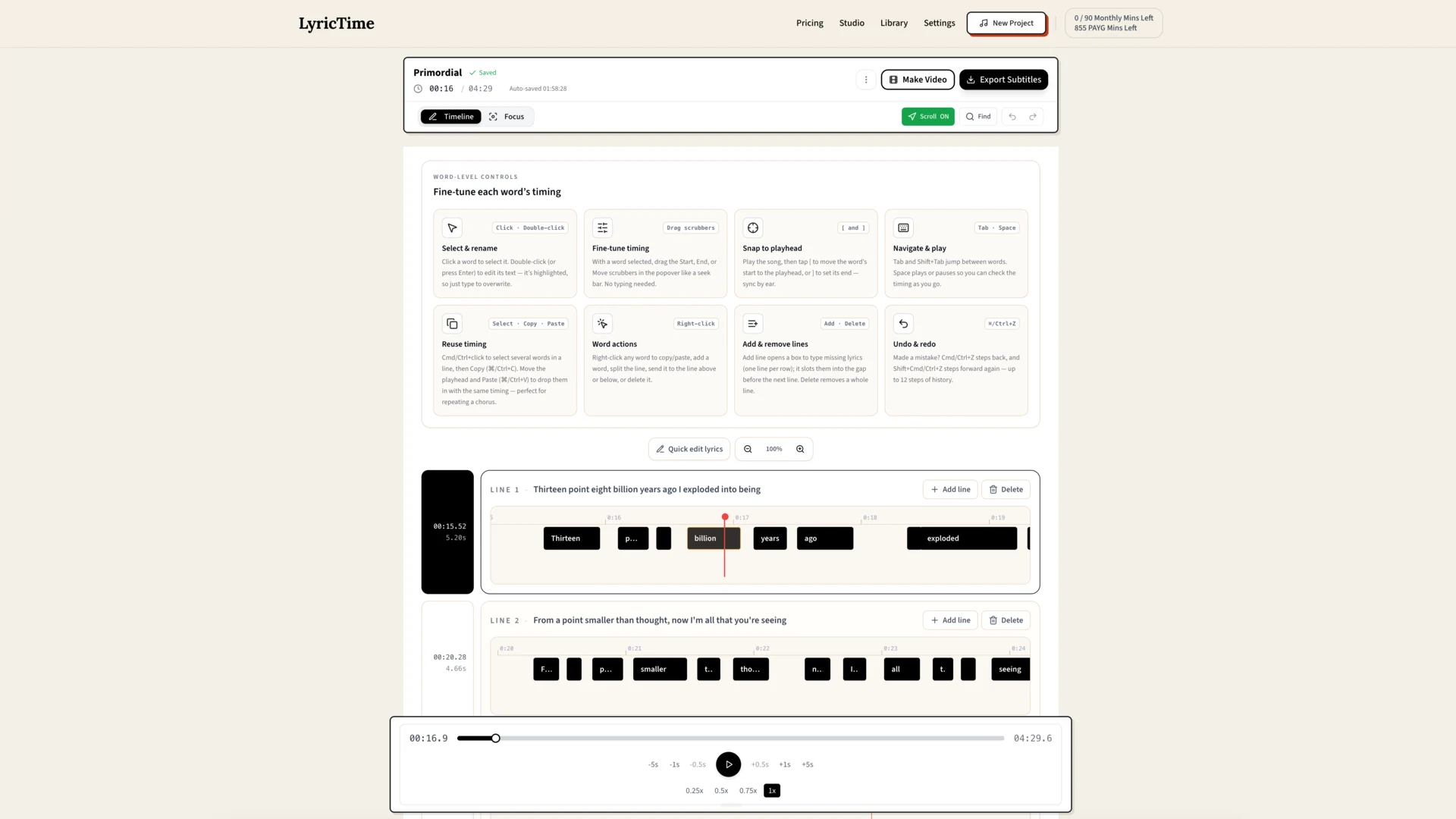
Every lyric line gets a timestamp accurate to 0.1-0.3 seconds. Perfect for karaoke videos where timing matters. Adjust any timestamp in the editor with keyboard shortcuts.
Full Editor Included
Edit any lyric, adjust timestamps, split or merge lines, and fine-tune everything before export. Visual timeline shows where lyrics appear during playback.
All Formats
Export to LRC (music players, karaoke), SRT (video subtitles for CapCut, Premiere), or VTT (web video, YouTube). All three formats included with every extraction.
What You Can Do With Extracted Lyrics
Once you have the lyrics, the possibilities open up
Learn the Words
Finally know what they're actually saying. Study the lyrics line by line with precise timestamps showing when each part is sung.
Create Lyric Videos
Make a lyric video for that obscure track you love. Export SRT subtitles and create karaoke-style videos for YouTube or TikTok.
Add to Music Players
Generate LRC files so compatible lyric viewers and music players can show synced lyrics alongside playback.
Lyrics Extractor FAQ
Does this work with any song?
A lyrics website is a database. A lyrics extractor works from your audio file. If the song has vocals and you can upload it as MP3, LyricTime can generate editable lyrics and timestamps from the recording itself.
How accurate is the extraction?
Very accurate for clear vocals. Our AI is trained specifically for music (not speech), so it handles singing, melody, and harmonies well. For songs with unclear or heavily processed vocals, you may need to edit some lines. The built-in editor makes corrections easy.
Can I edit the extracted lyrics?
Absolutely! The editor lets you modify any lyric line, adjust timestamps with keyboard shortcuts (0.5s, 1s, 5s jumps), split or merge lines, and fine-tune everything before export. You have full control.
How long does extraction take?
Transcription usually takes around 30-40 seconds. Editing time varies depending on how many lyric and timing changes are needed. Much faster than manual transcription.
What formats can I export?
LRC (for music players and karaoke apps), SRT (for video subtitles in CapCut, Premiere Pro, DaVinci Resolve), and VTT (for web video and YouTube). All three formats are included with every extraction.
Can I transcribe song lyrics for free?
The public demo transcribes song lyrics on a sample track at no cost, so you can judge the accuracy before paying anything. To extract lyrics from a song of your own, minute packs start at $3 and never expire — there is no subscription and no account needed to try it.
How do I extract lyrics from an MP3 or audio file?
Upload the MP3, WAV, or M4A and the AI listens to the vocals and writes them out. To extract lyrics from song audio this way, nothing is looked up in a lyrics database — the words come from the recording itself, so it works on tracks that were never published anywhere. You get the words as plain text, and timestamps alongside them if you want an LRC, SRT, or VTT file rather than just the lyrics.
What if lyrics are not available on Genius or AZLyrics?
That is exactly where this workflow helps most. Instead of searching multiple lyric sites, process your own audio in LyricTime and generate editable, timed lyrics from the track itself.
Related Pages
Explore adjacent workflows if you need different outputs.
Can't Find Lyrics Online? Extract Them.
Use the demo first to preview quality. To extract lyrics from your own songs, choose a paid minute option.
Demo is free • Own-song uploads use paid minutes
